Instagram does have a sophisticated algorithm in recognizing our habits and interests. This is why our feeds are often filled with content that matches what we like.
However, sometimes this algorithm actually becomes inconsequential. Instead of showing the content we want, the Instagram feed is filled with irrelevant posts.
But don’t worry, you can handle it with how to reset Instagram algorithm! That way, you can control what appears in the feed and Explore page. Want to know how? Read more!
Why does the Instagram algorithm need to be reset?
Instagram is a platform that is very clever at recognizing the interests and habits of its users. Every time you click, like, or even just browse a particular post, Instagram’s algorithm takes note of it and tries to provide increasingly relevant content. That way, our feed will be full of things we really like.
However, sometimes this algorithm can go ‘too far’. For example, you watched several videos about cute cats, but suddenly your Instagram feed is full of cat videos, even though you prefer content about traveling or culinary.
That’s because the Instagram algorithm tries to ‘understand’ your preferences, but can sometimes be misleading. As a result, we become distracted by irrelevant content and actually make the experience on Instagram less enjoyable.
This can also happen if you lend your account to friends or family. They may have different interests, and before you know it, the algorithm will start suggesting content that suits their preferences, not yours.
So, this is where it is important to reset the Instagram algorithm so that you can again enjoy content that is more in line with your wishes.
There are several easy ways you can try to reset the Instagram algorithm and make your feed and Explore relevant again. Check out the complete explanation below!
Reset Via Profile Settings
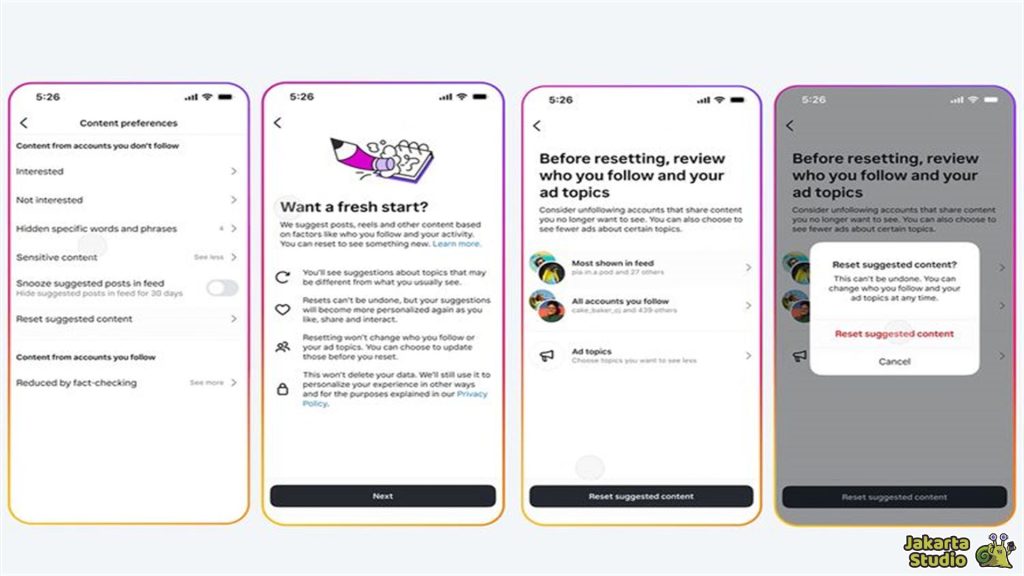
The first and most effective way to reset the Instagram algorithm is to access the content settings directly from your profile. If you have access to this feature, you can follow these steps:
- Enter the page Instagram profile You.
- Click the icon three lines in the top right corner to open the menu.
- Select the menu Settings and Privacythen search for parts Content Preferences.
- There, you will find options Reset Content Recommendations or Reset Content Suggestions.
- Follow the confirmation instructions on the screen until complete.
- After resetting, Instagram will start deleting old preference data and learn your new interests based on more recent interactions.
- In addition, Instagram will usually suggest you review the list of accounts you follow.
- If there are accounts that are no longer relevant, it’s best to stop following them so that the algorithm adapts more quickly to your new interests.
Delete Search History

Did you know that what you search for in the Instagram search field can greatly influence what appears in Explore? If you frequently search for certain things, for example, you may continue to be presented with recommendations related to those searches.
Therefore, one way to reset the Instagram algorithm is to delete search history. Here are the steps to delete search history on Instagram:
- Entered into Instagram profile you and click the three lines icon.
- Select the menu Your Activity (Your Activity).
- Scroll down and select Recent Searches.
- Click Delete All (Clear All) to delete search history.
- By deleting your search history, Instagram will lose old references and start providing recommendations that are more in line with your current interests.
Customize Interests on the Explore Page

After doing the two steps above, you need to signal Instagram about your new interest. This method is quite important for ‘educating’ the algorithm so that it knows what you like and what you don’t.
Here, you can take advantage of several features and interactions on Instagram:
Use the “Not Interested” Feature
When you find irrelevant content on the Explore page, you can notify Instagram with the “Not Interested” feature.
To do this, click the three dots icon on the post and select Not Interested. This will signal to the algorithm not to show similar content in the future.
Increase Positive Interactions
Apart from giving negative signals with the “Not Interested” feature, you can also increase positive interactions, such as giving likes, saves, or comments on content that you really like.
The more often you interact with content that matches your interests, the faster the Instagram algorithm adapts to your current preferences.
Refresh the Explore Page
After carrying out positive and negative interactions, you can refresh the Explore page to see if the content that appears starts to change.
The method is quite easy, open the Explore tab, then pull the screen down to refresh. Usually, Instagram will display more relevant content according to your new interests.
Conclusion
So, those are some easy ways to reset the Instagram algorithm and make your experience on social media more enjoyable. No need to worry anymore about messy feeds or irrelevant content.
Just do the steps above, and Instagram will readjust to your latest interests. So, what are you waiting for? Try it now, and feel the difference for yourself! Happy scrolling!
News
Berita Teknologi
Berita Olahraga
Sports news
sports
Motivation
football prediction
technology
Berita Technologi
Berita Terkini
Tempat Wisata
News Flash
Football
Gaming
Game News
Gamers
Jasa Artikel
Jasa Backlink
Agen234
Agen234
Agen234
Resep
Download Film
Gaming center adalah sebuah tempat atau fasilitas yang menyediakan berbagai perangkat dan layanan untuk bermain video game, baik di PC, konsol, maupun mesin arcade. Gaming center ini bisa dikunjungi oleh siapa saja yang ingin bermain game secara individu atau bersama teman-teman. Beberapa gaming center juga sering digunakan sebagai lokasi turnamen game atau esports.
Comments are closed, but trackbacks and pingbacks are open.