Here we will show you the steps on how to temporarily deactivate IG, read the explanation until the end.
Social media makes communication easier, but quite a few users feel mentally tired due to being connected too often.
If you are one of them, temporarily deactivating your Instagram account could be the best solution without having to delete your account permanently.
Below we present how to temporarily deactivate IG with easy, safe and effective steps, as well as several reasons why you should consider this step.
Why is it necessary to temporarily deactivate IG?
Instagram is designed to keep its users active. But without realizing it, productive time is often spent just scrolling.
Some common reasons why someone chooses to deactivate IG temporarily include:
- Reduces stress and social pressure.
- Focus on work or studies.
- Digital detox for mental health.
- Avoid excessive distractions.
- Want to take a break without losing your account.
The good news is that Instagram now provides a deactivate account feature which allows you to come back at any time without losing data.
Difference between Deactivating and Deleting IG Account
Before going into the steps, it is important for you to understand the differences:
To temporarily deactivate IG, things like profile, photos, comments and likes will be temporarily hidden. Data is safe and can be recovered at any time.
While permanently deleting an IG account, all your data will be deleted forever and cannot be restored.
If you just want to take a short break from social media, then temporarily deactivating IG is the best choice.
Things to Pay Attention to Before Deactivating IG
So that you don’t regret it, there are several things you should pay attention to before temporarily deactivating your IG account, including the following:
- You can only deactivate IG a maximum of once a week.
- The account can be reactivated at any time by re-logging in.
- Notifications, DMs, and account activity will temporarily stop.
- The username remains safe and cannot be used by anyone else.
By understanding these things now, you can deactivate your account more safely and calmly.
How to Easily Deactivate IG Temporarily
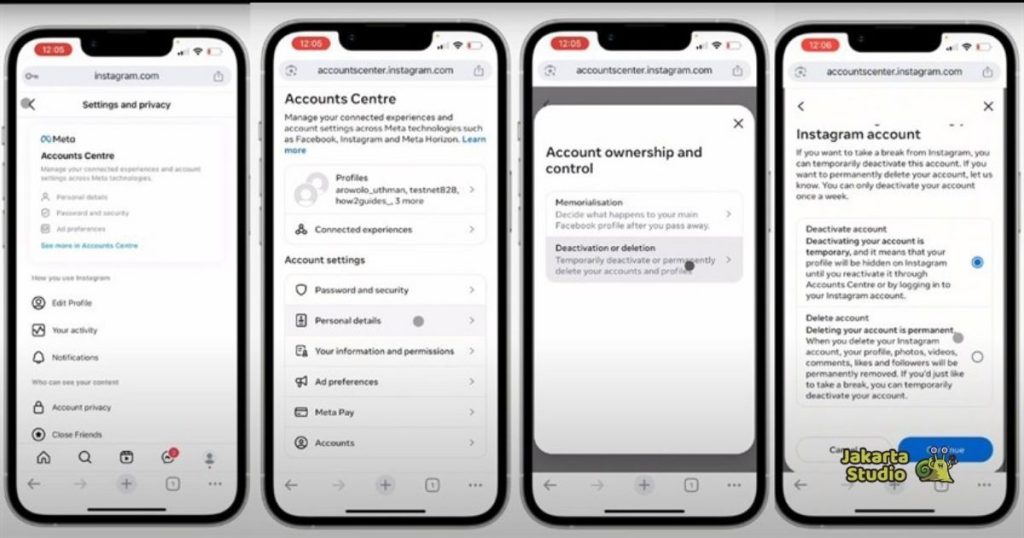
Please note, this feature is not available in the Instagram application, but can only be done via a web browser. Follow the steps below:
- Use a browser on your cellphone or laptop, then visit the official Instagram website and log in to your account.
- After logging in, click your profile photo in the top right corner, then select Profile.
- On the profile page, click the Edit Profile button.
- Scroll to the bottom of the page, then click the Temporarily disable my account option.
- Then Instagram will ask for your reason for deactivating your account, choose one then enter the account password.
- Click the Temporarily Disable Account button, then confirm.
- Your Instagram account has now been successfully deactivated temporarily.
When is the Right Time to Deactivate IG?
There is no right or wrong time, but temporarily deactivating IG is highly recommended when you feel:
- Too often comparing yourself with others.
- Productivity drops drastically.
- Emotions are easily exhausted due to social media.
- Want to focus on yourself.
Taking a break does not mean you are weak and is not a bad choice, it actually shows you care about your mental health and.
Cover
Knowing how to temporarily deactivate IG is a wise step for anyone who wants to take a break from the digital world without losing their account.
The process is fast, safe, and can be canceled at any time. Instead of continuing to feel burdened, there’s no harm in making space for yourself.
If you feel like Instagram is starting to dominate your time and thoughts, maybe this is the right time to press the pause button.
News
Berita Teknologi
Berita Olahraga
Sports news
sports
Motivation
football prediction
technology
Berita Technologi
Berita Terkini
Tempat Wisata
News Flash
Football
Gaming
Game News
Gamers
Jasa Artikel
Jasa Backlink
Agen234
Agen234
Agen234
Resep
Download Film
Gaming center adalah sebuah tempat atau fasilitas yang menyediakan berbagai perangkat dan layanan untuk bermain video game, baik di PC, konsol, maupun mesin arcade. Gaming center ini bisa dikunjungi oleh siapa saja yang ingin bermain game secara individu atau bersama teman-teman. Beberapa gaming center juga sering digunakan sebagai lokasi turnamen game atau esports.
Comments are closed, but trackbacks and pingbacks are open.